Vanity Resource had Shopping running but was getting buried by competitors with better feed data. I cleaned up the product feed, structured the campaigns by priority, and turned Shopping from a cost center into the brand's most efficient acquisition channel.
The numbers
Monthly store revenue, Aug 2025 to Mar 2026
$24,595 → $116,129
Engaged sessions vs prior period
+88.8%
Impression Share
+38%
Time to Profitability
60 days
Wasted Spend Recovered
22% of monthly budget
02 The breakdown
The Setup
Vanity Resource sells high-end bathroom vanities direct to consumer. The catalog was solid, the brand had margin, and the team had been relying on organic search with results that were not scaling.
The issue wasn’t demand. The issue was that bigger competitors with cleaner feeds were winning impression share on the exact searches Vanity Resource needed to own.
Google Shopping does not read your ad copy, because there isn’t any. It reads your product data and decides which queries you deserve to appear on. A vanity is a considered purchase with a specific vocabulary: size in inches, sink configuration, top material, finish. A buyer types those words. If the feed does not carry them, the auction never happens.
What the store did
Before I started, the store ran about $20,000 to $30,000 a month for years. In August 2025, the month Google Ads went live, it did $24,595 in orders. September came in at $49,451. In January 2026 Meta started too, and the store did $87,131, then $92,365 in February and $116,129 in March. Total ad spend across both platforms in that stretch was about $4,000 a month.
A few things to keep that honest. These are store order totals from WooCommerce, not revenue credited to one channel, and Google and Meta were both running for the January to March run, which is also renovation season. After March the store slid to $61,131 in June when Performance Max traffic quality dropped, then came back to $82,627 in July after I expanded the targeting and raised the budget.
WooCommerce Analytics, net sales by month. Blue is August 2025 to March 2026, green is the same months a year earlier.
What Was Broken
The feed was incomplete. Missing GTINs on a meaningful slice of products, generic product titles that didn’t include the searched-for attributes, and no use of custom labels. A title reading “Ashwood Vanity” competes for nothing. The same product titled with width, sink count, and top material competes for the query a buyer with a tape measure types.
One campaign, one priority, one bid strategy. No separation between branded queries, generic queries, and high-intent long-tail queries. Everything was getting bid on the same way, which means the clearance item and the flagship vanity were fighting each other for the same budget on the same terms.
No exclusions. Shopping was matching queries from people researching DIY projects, looking for repair services, or shopping at radically different price points. That was measurable in the behavior, not only in the search terms: paid sessions were bouncing on the same product pages organic visitors engaged with cleanly, which is the signature of an audience problem rather than a page problem.
What I Did
Cleaned the feed at the source. Worked through the WooCommerce product attributes to fix titles, descriptions, GTINs, and Google product categories. Fixing it at the source rather than in a feed rule matters, because the corrected attributes then serve the storefront, the sitemap, and any future channel instead of living inside one Merchant Center transformation nobody documents. Added a supplemental feed for the gaps the native feed couldn’t fill.
Tagged products with custom labels. Margin tier, seasonal flag, and best-seller status. These became the foundation for splitting Shopping by priority. Custom labels are the only lever that lets a retailer tell Google which products deserve which budget, and most catalogs I audit leave all five slots empty.
GTM workspace post-cleanup. GA4 events, Google Ads conversion tags, and WooCommerce listeners all firing on the right triggers.
Built a priority structure. Three Shopping campaigns running at high / medium / low priority with shared negatives, so high-intent queries got routed to the campaign with the strongest bids and clearance products got routed to the campaign with the tightest budget.
Built the negative list. Negatives layered in across the structure, with a weekly review cadence to keep the noise out.
The Result
Revenue more than doubled within the first 60 days, climbing well over 100 percent versus monthly averages
Impression share on the highest-intent queries grew 38 percent on the new Shopping structure
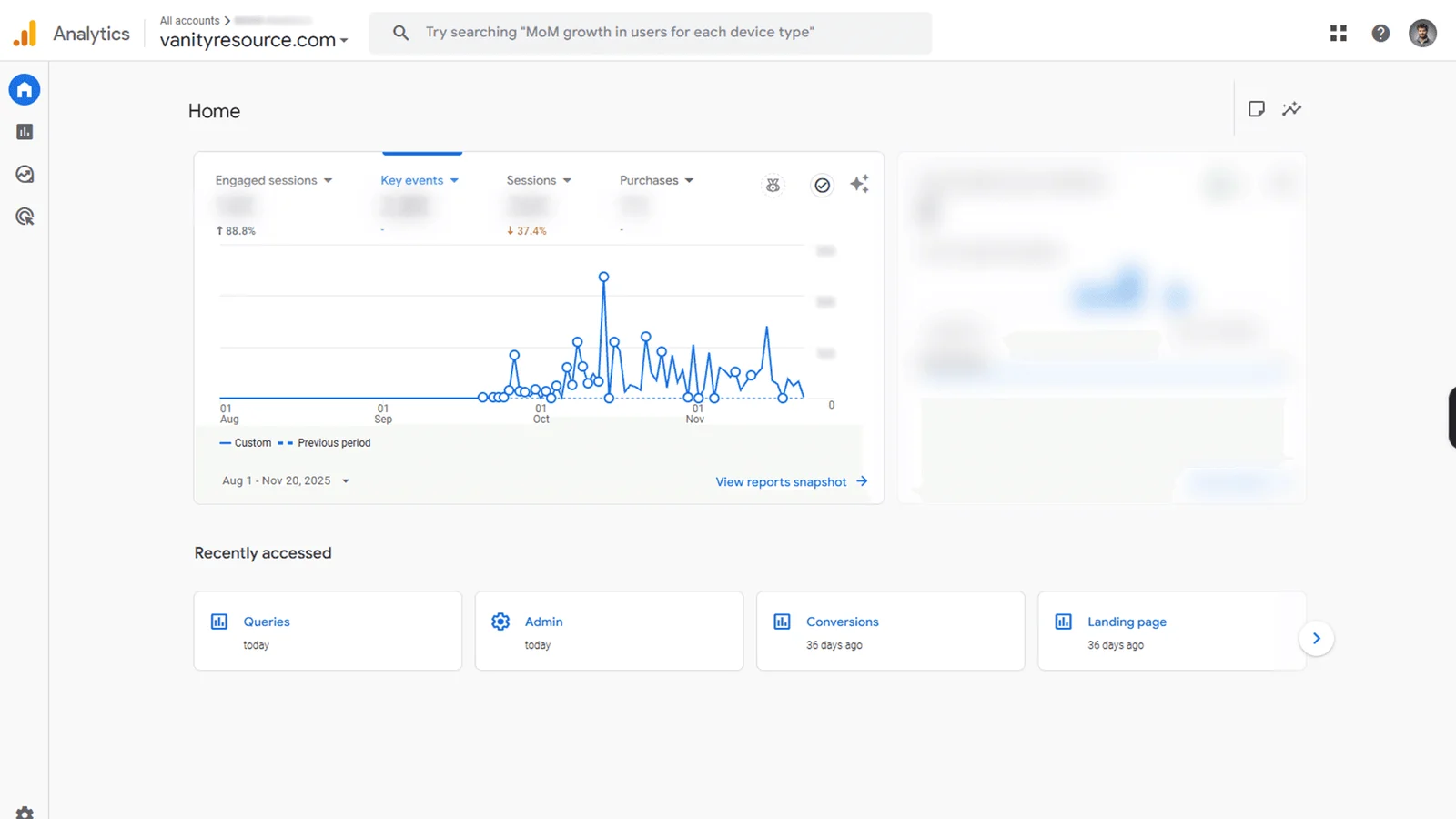
Engaged sessions rose 88.8 percent against the prior period
22 percent of the monthly budget that had been going to wrong-fit queries got reallocated to working ones
The engaged-sessions number is the one worth sitting with. The product pages never changed. The same pages that were bouncing paid visitors started holding them, because the visitors arriving were the ones the pages were written for.
GA4 dashboard post-rebuild. Engaged sessions up 88.8% versus the prior period.
The owner’s words: “Wonderful! Explains it thoroughly so I understand. More importantly, seeing great results in such a short time period.” · Olivia Streeton
What I Did Not Claim
I did not run a holdout. The feed cleanup, the priority structure, and the negatives shipped inside the same 60-day window, and the revenue lift is the combined effect of all three against the prior period. Seasonality on a bathroom-remodel catalog is real, and a single 60-day comparison cannot fully separate it from the work. What the numbers support is a directional read on a rebuilt structure, not an incrementality measurement.
I also did not touch the site. No new photography, no page redesign, no offer change. That is the constraint that makes the engaged-sessions number readable at all.
The Takeaway
In Google Shopping, the campaign settings are downstream of the feed. You can have the perfect bid strategy and the right negatives, but if your titles don’t match the queries buyers are typing, you’ll lose to the brand that does match.
Most Shopping audits I run start with a feed audit. That’s where 70% of the wins live.
If you sell considered-purchase products with measurable attributes, the diagnostic takes an afternoon. Export your feed. Read fifty product titles as if you were the buyer. Count how many carry the dimension, material, and configuration words a buyer would type. Then pull ninety days of search terms and mark the share that came from someone who was never going to buy at your price point. Those two numbers tell you whether your problem is the feed or the bids, and in my experience it is the feed. The same work runs inside my monthly Shopping and imagery work for home and furniture brands. For the storefront side of the same vertical, see Emma Grace Home, a furniture store I built solo with every product image rendered in-house.
Fourteen months after the original rebuild, Sugar Babies was ready for the next layer. I expanded one Performance Max campaign into a six-campaign geo × value-band matrix, seeded 26 Customer Match segments into the bidding signal, refreshed all 300 search themes across the matrix, and shipped the catalog SEO foundation the matrix runs on.
An online retailer with strong organic demand was running a single Performance Max campaign trying to do everything at once. I rebuilt the structure around brand isolation, smart feed segmentation, and clean server-side tracking, and turned a flat account into a predictable growth engine.
Read the breakdown→
Free ads audit, written by me
Want this kind of breakdown on your account?
Add me as a read-only user and I'll write the audit myself: where the leak is and what to fix first, 5 to 7 pages, back within 24 hours of access. No call needed. If you'd rather talk first, a call is open too.